Browser extension
PriceBuddy Companion is the browser companion for PriceBuddy. Click the toolbar icon on any product page to open an in-page panel that can track the product, show its price insights, and tune the store's scrape strategy without leaving the page.
The extension is a client only. It holds no data of its own and does nothing until you point it at your own PriceBuddy instance.
Install
Chrome, Edge and other Chromium browsers
Install PriceBuddy Companion from the Chrome Web Store.
From source
git clone https://github.com/jez500/pricebuddy-browser-extensions.git
- Open
chrome://extensions. - Enable Developer mode (top right).
- Load unpacked and select the
chrome/directory.
Firefox is not supported yet.
Configure
- Right-click the toolbar icon and choose Options, or open the panel and press Open settings.
- API URL — the base URL of your instance, for example
https://pricebuddy.example.com, with no trailing/api. - API token — create one in PriceBuddy under API keys (
/admin/api-keys). - Press Save. Your browser will ask for permission to reach that address; the extension requests no site access until you grant it.
- Press Test connection to verify the settings via
GET /api/user.
Token scopes
| What you want to use | Abilities needed |
|---|---|
| Store helper and data extraction only | user:detail, meta-extraction:extract, client-config:read |
| Tracking products and price insights | An all access (*) token |
The panel shows a clear message when the token is too narrow, rather than failing silently.
What it does
Track
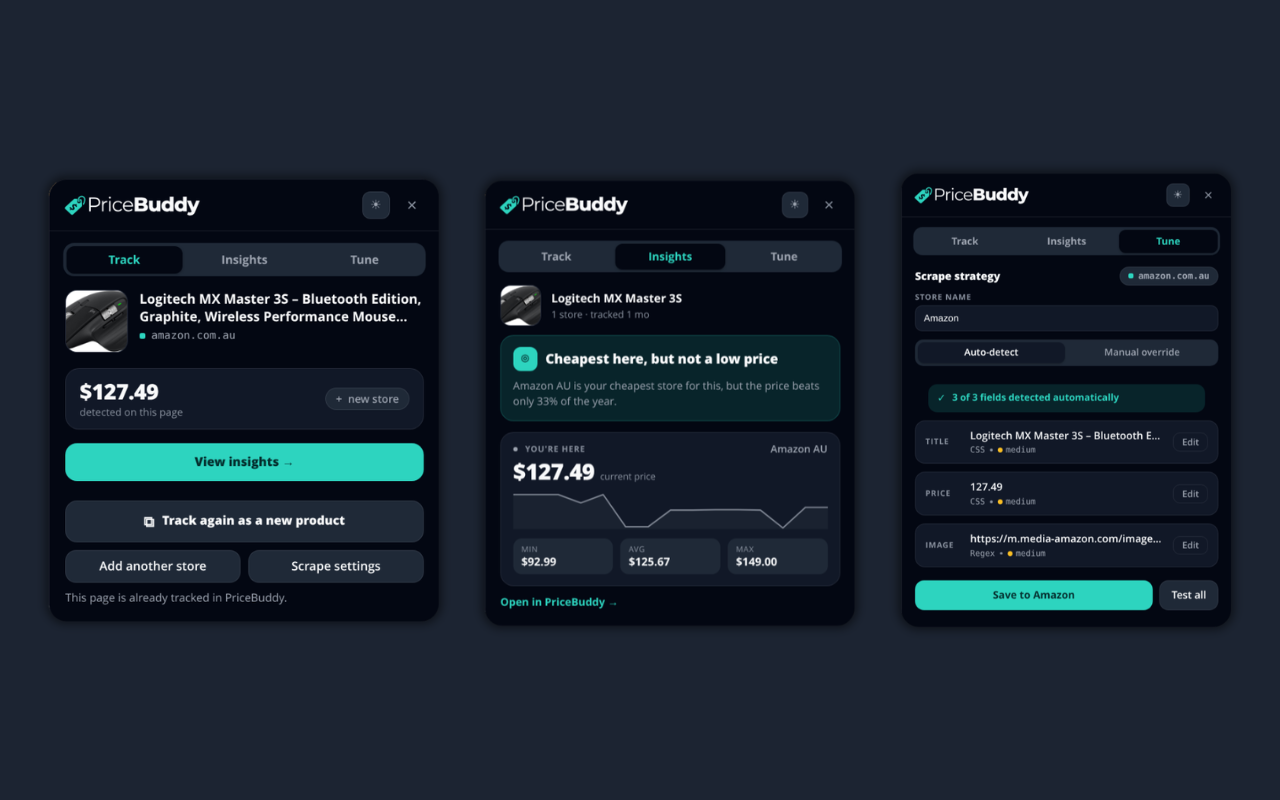
The landing tab for a page that is not tracked yet. It shows the product title, image and domain, the price detected on the page, and how many PriceBuddy stores already match the domain. Track this product starts monitoring it and switches you to Insights.
Insights
For a product you already track, the panel shows:
- a verdict card — "Good time to buy here", "Cheaper at <store>" with the saving and a one-click button, or "Cheapest here, but not a low price" when the deal score disagrees with being the cheapest store;
- a "You're here" card — the current store's price, its own history sparkline, and that store's min, average and max;
- other stores' prices with a trend indicator and a BEST badge;
- all-store min, average and max, plus a link into PriceBuddy.
Which listing counts as "here" is decided by the server, not by matching URLs in the browser.
Tune
A workbench for store scrape strategies.
Store name and Fetched with apply to the whole store, not one product. Fetched with picks the scraper: HTTP is a plain fetch and is faster, Browser drives a real browser and is the one that works on pages that render their price with Javascript.
If every field comes back empty on a site where you can clearly see a price, switch Fetched with to Browser and press Test all. An empty result looks like a bad selector, but it is usually the wrong fetch method.
In either mode you can then use:
- Auto-detect — asks PriceBuddy to detect a strategy for the page and lists what each field (title, price, image) resolved to, with a confidence hint. Try AI detection appears when a field is missing and asks your instance to work the selectors out with its configured AI provider. It is slower and best-effort, and it tells you when it gave up.
- Manual override — per field, choose a strategy type (Schema.org, CSS, XPath, Regex or JSON path) and a value. Pick on page lets you click the element and generates a resilient selector, preferring
itemprop,data-testid,data-testornameover generated class names, with attribute extraction such as|src,|contentor|value.
Test all scrapes the live page with your draft strategy, including the draft fetch method, and reports matched or no-match per field so you can verify a change before committing it. Save to store creates the store, or updates the existing one.
Drafts are saved per domain as you type, so your work survives a page reload.
Permissions and privacy
The extension ships with no host access at all.
| Permission | Why |
|---|---|
activeTab | Temporary access to the current tab, granted by clicking the toolbar icon. The panel is injected then, so no content script runs on every page you visit. |
scripting | Injects the panel into that tab. |
storage | Settings, theme and per-site drafts. |
optional_host_permissions | Never requested wholesale. The options page requests only your PriceBuddy origin, once, when you save it. |
Your API token never leaves the extension's service worker. Every authenticated request is made there, and the in-page panel is only told the base URL and whether the extension is configured. The extension ships no remote code or remote resources, and everything it renders goes through textContent so nothing your instance returns can execute in a page.
See the extension's privacy policy for what is stored and what is sent where.
Troubleshooting
- "Not configured" or connection errors — check the API URL has no trailing
/apiand press Test connection. Your browser must also have been granted permission for that origin. - HTTP 403 when tracking a product — the token is too narrow. Use an all access (
*) token. - Every field is empty in Tune — switch Fetched with to Browser and press Test all.
- The panel does not open — the extension only injects on click, so reload the page after installing or updating the extension.
Source
The extension is developed at jez500/pricebuddy-browser-extensions. Bugs and feature requests belong in that repository's issue tracker.